FRITZ!OS 7.50 now available!
Already there is a FRITZ!OS 7.50 !
FRITZ!OS 7.50 makes the digital home faster and smarter - more than 150 new features and improvements await you. Discover the most important improvements now. Implementing FRITZ!OS 7.50 starts with FRITZ!Box 7590, for other current FRITZ! the products will be updated step by step.
Greater efficiency in your Mesh Wi-Fi network With dynamic smart repeating FRITZ!OS 7.50 boosts Wi-Fi Mesh performance. If you are using the FRITZ!Repeater or FRITZ!Box as Mesh Repeater, you will benefit from higher data throughput and greater stability. Because now both Wi-Fi bands are available for optimal connection between FRITZ!Box in conjunction with Mesh Repeater.
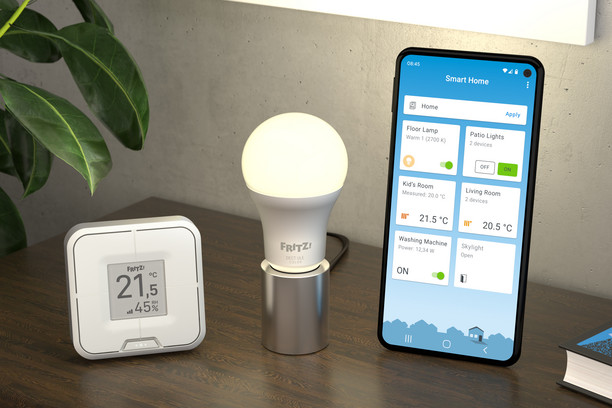
FRITZ!, is also a Smart Home - with the new software came a variety of options for planning scenes and procedures in the Smart Home
FRITZ!OS 7.50 allows you to create practical automation for your smart home. You combine several Smart Home settings (e.g., templates) in a single scene and can activate them by gesture via FRITZ!App Smart Home, FRITZ!Fon or FRITZ!DECT 440. For example, for the "Coming Home" scene, all thermostats on radiators can be set to a comfortable temperature at the same time, and LED lighting smart plugs, Wi-Fi and/or guest Wi-Fi can be turned on at the same time, and the answering machine can be turned on.
Procedures are powerful "if-then" combinations that trigger scenes or templates in your smart home when a specific condition occurs. For example, if the humidity measured by the FRITZ!DECT 440 reaches a certain level, the pre-configured scene "Ventilation" with FRITZ smart plug will be applied!DECT 200 with connected humidifier.
FRITZ!Fon learns to talk!
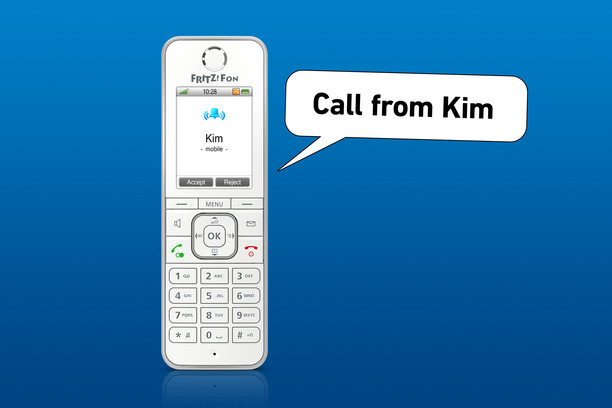
FRITZ!Fon gets new appointment calendar and learns to talk. With the new FRITZ "Voice" ringtone!Fon now notifies calls and calendar entries with messages such as "Call from Kim" or "Leave now for the train station.".
Dealing with unwanted callers also becomes more convenient: callers who are not in the phone book can be blocked or redirected to an answering machine. Scan the QR code and you have a connection: VPN with WireGuard Scan the QR code and your VPN will be set up - with WireGuard VPN protocol it's that simple. Get fast and convenient access to your home network on the go - WireGuard is also suitable for connections while working remotely. The existing IPSec VPN protocol now supports both IPv4 and IPv6 connections and is ready for use with the latest versions of Android and iOS.
Greater ease of use and clear FRITZ menus!Box
FRITZ user interface!Box now has a new look with better readability for optimal convenience. In addition, the integrated online help has been given a refreshed look and keyword search has been added for quick access to tips and instructions.
Update today! All new FRITZ features!OS 7.50 can be found in the detailed release notes of the. In the user interface of the FRITZ!Box (http://fritz.box) you can start searching for updates to the FRITZ!OS 7.50 (System > Update > Search for new FRITZ software!OS).