Save to shopping list
Create a new shopping list
FRITZ Router!Box 6820 LTE

FRITZ Router!Box 6820 LTE

  • LTE modem up to 150 Mbit/s
  • LTE (4G) and UMTS (3G) connectivity
  • Wi-Fi: WLAN N 2.4GHz (up to 450 Mbit/s)
  • Gigabit LAN port
  • Rich additional features
146,95 EUR
incl. VAT / pcs.
Product not available
31 days for free returns
This product is not available in a stationary store
Safe shopping
Deferred Payments. Buy now, pay later, if you don't return it
Buy now, pay later - 4 steps
When choosing a payment method, select PayPo.PayPo - buy now, pay later
PayPo will pay your bill in the store.
On the PayPo website, verify your information and enter your social security number.
After receiving your purchase, you decide what suits you and what doesn't. You can return part or all of your order - then the amount payable to PayPo will also be reduced.
Within 30 days of purchase, you pay PayPo for your purchases at no additional cost. If you wish, you spread your payment over installments.
Free delivery to parcel machinesMore information
Smile - deliveries from online stores when ordered from EUR11.85 are for free.
You buy and delivery is free!
deliveries from online stores are free when you order EUR11.85 are for free.
Free delivery includes parcel delivery to a parcel machine

AVM FRITZ!Box 6820 LTE

At a glance

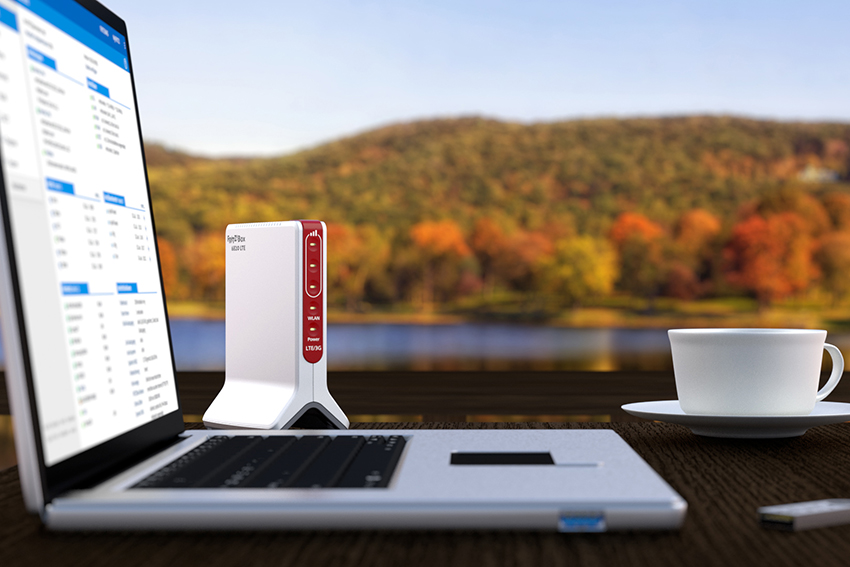
Small and compact FRITZ device!Box 6820 LTE v3 will adapt to any conditions. Regardless of the current network quality, the 6820 always ensures maximum speed - from UMTS to LTE. With Gigabit LAN, all home network users have fast access to music and movies. And wireless Internet use over high-speed WLAN on tablets and other mobile devices is extremely fun.
  • LTE (4G), UMTS (3G) and GSM (2G) modem
  • SIM slot Yes
  • Wi-Fi N 2.4GHz (450 Mbit/s)
  • LAN ports 1x Gigabit LAN
  • VPN Yes, up to 12 IPSec VPN tunnels
High-speed internet - anytime

Large program updates can be downloaded quickly with speeds as fast as 150 MBit/second. The simple, sleek shape is completely tailored for the best signal reception and thus high data rates. It's also an advantage for the smartphone used at home, as apps that download data can use the LTE router's connection. Can be used throughout Europe

FRITZ!box 6820 LTE supports all popular data frequencies in Europe, so it provides Internet access both at home and on vacation or business trips. The device will automatically select the optimal standard and frequency of network connection More than 30% more WiFi network power

FRITZ!Box 6820 LTE v3 creates a WLAN N 2.4GHz 450 Mbit/s wireless network for high-speed network usage. Latest technologies offer transfers up to 30% faster than previous generation devices. This makes the router even more convenient for downloading and uploading data.
Certainly FRITZ!Box

FRITZ!Box is synonymous with security! Comprehensive security concept protects communication data. We are constantly testing and improving it. Free updates ensure a high level of security at all times. FRITZ!OS - a wealth of software

FRITZ!OS, the operating system of the FRITZ device!Box, is regularly updated with new features. With a central compilation on your home network, you'll always be up to date. You can use parental controls and guest WiFi access, in addition to always knowing your current data usage thanks to the online counter. All updates and applications are, of course, free. Perfect simplicity

Awarded by specialist press and praised by users, FRITZ operating concept!Box has only one goal: to make the user experience as easy as possible. It provides a clear interface and wizards that guide you step by step.
MESH - WiFi for sizes S to XL

With MESH technology, your home network grows to exactly the size you need:

S - smaller and medium-sized single-floor apartments

L - medium-sized apartments/houses, maximum two-storeys

XL - or more: large multi-story apartments/homes The next big thing - now available from FRITZ!

The most convenient way to use the Internet at home is wirelessly! But sometimes WiFi coverage is poor in some rooms. The solution in this case is a MESH network. This brand new technology is now mainstream in home networks. The good news is that you already have it with FRITZ products!
MESH - what it really means?

Sometimes one wireless network is not strong enough for the whole house. Reception may be weaker or drop out may occur in some rooms. A mesh network does the following: multiple access points generate multiple WiFi wireless networks, which are combined to form a single, common, closed network. The entire WiFi network created in this way has only one name and password, the end devices, for example, smartphone, tablet, laptop, etc., switch automatically between the transmitters of the network, without the knowledge and intervention of the user.

With mesh networks, it's easy to enjoy high speeds while surfing, streaming video or gaming - seamlessly in even the remotest corners of any room.
FRITZ! + FRITZ! = MESH

The heart of your MESH network is always your FRITZ!Box. If you want, you can easily add more devices:

FRITZ! WLAN Repeater provide even greater WiFi wireless coverage.
FRITZ devices! WiFi-enabled powerline uses the electrical system as an additional data highway.
Devices sync with each other automatically - you don't have to do anything.
Everything in sight and a few clicks away.

The overview of the home network has been expanded to include an overview graphic of the MESH network, where you can see active FRITZ devices! and the device through which the smartphone, tablet, laptop or game console is connected.

Want to offer your guests high-speed Internet access, securely separated from your home network? FRITZ!Hotspot makes it just a click away. Similarly, you can automatically disable WiFi at night for all FRITZ devices!
Interesting? Try!

FRITZ!OS 7 will prepare your home network to support MESH technology. New FRITZ software!OS is available for the FRITZ router!Box and FRITZ amplifier!Repeater and WLAN-enabled FRITZ products!Powerline.
MESH is a word that hides a lot of.

Band Steering - Dual-Band WiFi devices automatically connect to the less loaded WiFi frequency range at any given time

Cross Band Repeating - in the case of FRITZ amplifiers!WLAN Repeater always uses the WiFi range that provides the fastest connection

IPTV and streaming optimizations - provides uninterrupted movie watching and music listening pleasure

Beamforming - antennas send signals exactly in the direction of end devices - providing even greater range and speed
Product specifications
  • LTE (4G), UMTS (3G) and GSM (2G) cellular modem
  • WLAN N speed 450 Mbit/sec
  • Guest network Yes
  • VPN IPSec Yes (up to 12 tunnels)
  • Parental control Yes
  • LAN ports 1x Gigabit LAN
  • Warranty 5 YEARS
  • Dimensions (L. x width. x height.) 64 x 99 x 134 mm
  • Power consumption 6 W
  • Product code 20002907
  • EAN 4023125029073
Brand
Symbol
20002907
Producer code
4023125029073
Warranty
DSL modem
ADSL & ADSL2+
no
VDSL & VDSL2
no
VDSL 35b supervectoring
no
DSL speed
not applicable
CONNECTION FROM OUTSIDE. MODEM
WAN port
no
WAN port speed
no
External connection. USB LTE & HSPA modem
not
MOBILE CONNECTIVITY (SIM CARD)
5G modem
not
Maks. 5G speeds
not applicable
Supported 5G bands
not applicable
5G band aggregation
lack of data
LTE (4G) modem
yes
Maks. LTE speed
150 Mbit/s
Supported LTE bands
FDD: 2.1 GHz; 1.8 GHz; 850 MHz; 2.6 GHz; 900 MHz; 800 MHz; 1.5 GHz TDD: 2.6 GHz; 2.3 GHz; 2.5 GHz;
LTE band aggregation
not
UMTS (3G) modem
yes
2G (GSM) modem
not
Voice over LTE - LTE voice functions (from FRITZ!OS 7.5X)
not
External antenna connections
not
Type of antenna socket
not
FIBER OPTIC COMMUNICATIONS - ONT (OPTICAL TERMINARTION UNIT)
GPON
not
XGS-GPON
not
AON (IEEE 802.3ah-2004 1000BASE-BX10)
not
LOCAL AREA NETWORK - LAN
Number of Gigabit LAN ports
1
Number of 2.5 Gigabit LAN/WAN ports
0
Wake-up on LAN
yes
WIRELESS NETWORK - WIFI
Wi-Fi generation
Wi-FI 4
Wireless standard according to IEEE
802.11n
Maximum speed (gross)
450 Mbit/s
Support for 2.4 GHz band
yes
Support for 5 GHz band
not
Support for 6 GHz band
not
MU-MIMO support
not
Type of encryption
WPA2
WPA3
Type of antennas
embedded
Built-in controller for MESH networks
yes
Wi-Fi hot-spot function / separate network for guests
yes
Autochannel function - selecting the optimal Wi-Fi channel
yes
Wi-Fi signal power reduction and Wi-Fi off/on schedule
yes
SMART HOME - HOME AUTOMATION
Base for connectivity with DECT / DECT ULE devices
not
Support for the HAN-FAN standard
not
Advanced programming, scenarios and rules
not
TELEPHONY FUNCTIONS
Functions of the telephone exchange
not
Base for DECT wireless handsets
not
Maks. Number of DECT wireless handsets
not applicable
Number of internal ports. analog (FXS)
not applicable
Number of internal ports. digital ISDN (S0)
not applicable
Connecting a POTS or ISDN landline (FXO)
not
Number of VoIP accounts
not applicable
Support for SIP-TRUNK
not applicable
Fax functions (fax sending and fax2mail)
not applicable
Answering machines
not applicable
Blocking incoming and outgoing calls
not applicable
Call forwarding
not applicable
Synchronize phone books with Google Contacts, iCloud, WebDAV
not applicable
OTHER NETWORK FUNCTIONS
Number of USB ports 3.
no
Number of USB ports 2.0
no
VPN Server - IPSec
yes
VPN Server - Wireguard (from FRITZ!OS 7.5X)
yes
UPnP / DLNA media server
not
File server (FTP, FTPS, WebDAV, SMBv3)
not
FRITZ File Server!NAS - access to files via browser and app
not
Support for IPv6
yes
Firewall (TUV certified)
yes
Parental control
yes
Push notification function
yes
Automatic backup of settings
lack of data
Automatic free updates
yes
Print server - printserver
not
ECO mode - saving electricity
yes
Network traffic management - priorities for network services and devices
yes
Operating system
FRITZ!OS
User interface language
polish
EN, DE, NL, FR, IT
Manufacturer's warranty
5 years
Dimensions
134 mm
99 mm
64 mm
Do you need help? Do you have any questions?Ask a question and we'll respond promptly, publishing the most interesting questions and answers for others.
Ask a question
If this description is not sufficient, please send us a question to this product. We will reply as soon as possible. Data is processed in accordance with the privacy policy. By submitting data, you accept privacy policy provisions.
5 years

aVM 5 year warranty description

Write your opinion
Your opinion:
5/5
Add your own product photo:

Guide

Czy można mieć dwa routery w jednej sieci?
Routery służą do tworzenia wewnętrznych sieci informatycznych, dzieląc jednocześnie łącze internetowe. Nowoczesne urządzenia oferują oczywiście wiele innych możliwości, w tym tworzenie centrali telefonicznej czy dysków sieciowych. Taka sieć nie musi być jednak obsługiwana tylko przez jeden router. Co w sytuacji, gdy na przykład zabraknie portów LAN do podłączenia kolejnych urządzeń? Czy można wykorzystać kolejny router? Na to pytanie odpowiemy w dalszej części – zapraszamy do lektury.
Read more
Stable Internet on vacation
When planning a holiday break from everyday life, we often don't want to deprive ourselves of all its attributes. One is the fast and stable Internet needed to communicate with loved ones and share vacation experiences. We suggest how to stay online during the trip.
Read more
Który router na kartę sim kupić do swojego mieszkania?
Dynamiczny rozwój technologii internetu mobilnego sprawił, że dziś praktycznie każdy może uzyskać dostęp do sieci. Ceny tych łączy systematycznie spadają i jednocześnie stale zwiększa się ich przepustowość. Jeśli chcesz bezprzewodowo rozprowadzić taki internet po mieszkaniu, musisz zaopatrzyć się w dobry router. Na co zwrócić uwagę i jakie urządzenia są godne uwagi? Sprawdź już teraz!
Read more
Jak przyspieszyć swój internet? Poznaj porady doświadczonych administratorów sieci!

Płacisz niemałe pieniądze za dostęp do szybkiego internetu, a pomimo tego jego jakość pozostawia wiele do życzenia? Jeśli korzystasz z sieci bezprzewodowej w domu lub firmie, problem wcale nie musi leżeć po stronie dostawcy. Zanim zadzwonisz do niego z pretensjami, zacznij od upewnienia się, czy dobrze skonfigurowałeś swoją sieć. Jak przyspieszyć internet w budynku i poprawić stabilność łącza bezprzewodowego?

Read more
Który router kupić dziecku na gwiazdkę?
Dzieci należą do szczególnej grupy użytkowników internetu. Spędzają w nim dużo czasu i niestety są najbardziej narażone na nieodpowiednie treści. Rolą rodziców jest przede wszystkim kompleksowa edukacja i wyrabianie dobrych nawyków. O bezpieczeństwo najmłodszych w sieci może jednak zadbać również sam router. Planujesz kupić dziecku takie urządzenie pod choinkę? Sprawdź w takim razie już teraz, co powinieneś wybrać.
Read more
Jak przygotować sieć wifi na zakupy online?
Najbliższe tygodnie na pewno zdominują zakupy przedświąteczne, z których duża części będzie odbywać się w internecie. Choć zakupy online są wygodne i tanie, to jednak wiążą się z pewnymi zagrożeniami. Kupując w sieci, musisz zadbać o swoje bezpieczeństwo, między innymi prawidłowo zabezpieczając domową sieć WiFi. Sprawdź już teraz, jak to zrobić!
Read more
Jak skonfigurować sieć WiFi w mieszkaniu studenckim?

Samodzielne skonfigurowanie sieci WiFi nie jest trudne. Trzeba jednakże znać parametry sieci internetowej, wiedzieć, jak je zmienić, a także w jaki sposób dostać się do ustawień routera. Poniżej przedstawiamy wskazówki pozwalające na sprawne i prawidłowe skonfigurowanie sieci internetowej w mieszkaniu studenckim.

Read more
pixel