

Home network security - how to effectively secure your router?
Strong password and software updates- the basis of router security
Start securing your router by restricting physical access to it. The key device should stand in a place inaccessible to unauthorized persons, since the possibility of connecting directly to it with a network cable, writing down the MAC address, Wi-Fi password or even the administrative interface from the nameplate on the case, can facilitate a potential attack.
The router password, like other important passwords and access codes, should not be easy to guess and standard. Under no circumstances should you leave factory passwords like "admin" or "1234". FRITZ routers already out of the box, they offer a high level of security, as each unit has a unique password for the administrator and for connecting to Wi-Fi.
Network security is also an age-old contest of sword and shield: for every new security feature, criminals try to find a way, and hardware and software manufacturers are constantly eliminating gaps in protection, making them immune to possible threats. For this reason, you should ensure that the latest version of the system software (firmware) is always installed on our router. In the case of FRITZ brand products! updates are provided periodically and for free, and uploading the software requires one click in the configuration interface, the MyFRITZ app! If you select the appropriate option in the configuration, the software update can also be completely automatic.
Additional security features - MAC address filtering and parental control
If we already have the security of our home network against outside intrusion, we still need to think about protecting users already inside it. A set of filters called "parental control" will come to our aid here, which allows us to restrict access to selected harmful websites, the addresses of which we can put on a "black list". In addition, we can protect our little ones from excessive use of the Internet. Each child and the devices used can be assigned a daily limit of time, spent on the network, and on top of that, you can determine at what times on particular days of the week, the connection will be possible.
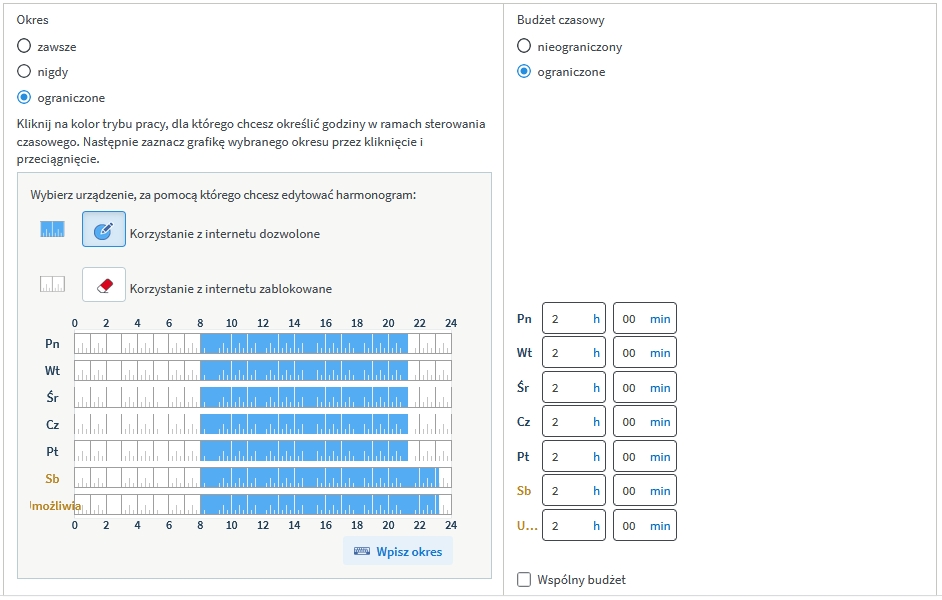
In the event that a person exhausts the allocated limit, but there is a need for an ad hoc extension for an additional 45 minutes. with a single ticket.
Wi-Fi for guests - a secure solution for visitors
O security in wireless networks we take care through various mechanisms and at several levels. The basic issue is a strong Wi-Fi password. In FRITZ wireless routers!Box, an example of which is aC router FRITZ!Box 4040, password is unique for each device. When doing so, ensure that the best possible encryption standards (WPA2 / WPA3) are enabled in the access point configuration.
If our network is vulnerable to invasion by unwanted users, we can use MAC address filtering to protect it. This will cause only network cards (embedded in laptops, tablets, phones and other devices) whose hardware MAC address is known to us and will be registered in the router to connect to our Wi-Fi. Foreign, unknown cards will be denied access.
However, if we would like to simultaneously maintain limited access to our local network, but at the same time allow adventurous users to use the Internet, we can use a special "guest Wi-Fi" feature. Its activation makes available a second, separate Wi-Fi network, governed by different laws. Connecting guests do not access internal resources of the local network, i.e. other connected computers, servers, printers and network drives. They can only use the Internet, and only for web browsing and Internet mail service.
